
Smart feeders work well for families because they take the guesswork out of feeding time, so more than one person can keep the cat fed on the same schedule. Everyone sees the same portions and times, which cuts down on the classic problem of two people both topping up the bowl.
Kids can help too, as long as the adults set the rules. A child can check that the feeder has food, press a button to start a meal, or look at the schedule on a wall calendar that matches what the app shows. Keep the controls and the food storage out of reach of small hands if you have toddlers around.
Some models let you pick portion sizes and set several meal times in a day. That helps when a busy household has different people home at different hours. For example, a parent who works late can set the evening meal, and a teen can keep the morning one going. The meal plan stays the same no matter who is home.
If your household has a mix of people and pets, look for a feeder with a stainless steel bowl or a bowl that is easy to pull out and wash. Quick cleaning makes it more likely that everyone will actually do it. Also check how the feeder handles power. Use the plug and cord the maker supplies, keep cords away from water and chewing pets, and confirm the power requirements in the manual before you plug it in.
For a family that wants one feeder with a schedule and a simple app, the PetSafe Smart Feed Automatic Pet Feeder, 6L Programmable with Alexa is a good example of the kind of feeder that fits this setup. Check the product's own safety information and the manual for any details you need before you use it. Talk to your vet about how much and how often your cat should eat.
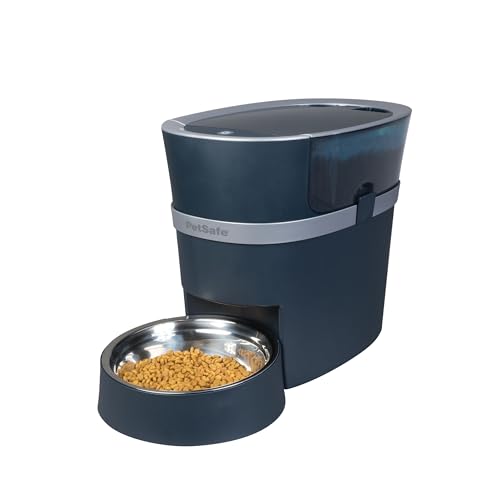
PetSafe Smart Feed Automatic Pet Feeder, 6L Programmable with Alexa
A programmable feeder that drops meals on schedule and works with Alexa and a phone app.
Product information
Our review: 4.2 out of 5
Product links
Setting Up Feeding Schedules Everyone Can Follow
Start with the cat, not the calendar. Ask your vet how many meals a day suits your cat and how much food each meal should be. Once you have those numbers, you can build a schedule around them. Write the plan down so nobody has to guess.
A simple way to split the work is by time slot. One person owns the morning feed, another takes the evening, and a third covers weekends. Each person adds the meal to the feeder app for their slot and checks that it shows up on the shared calendar. If someone is away, they just move their slot to a backup person and say so in the family group chat.
Set the schedule so meals land at roughly the same times every day. Cats tend to notice when dinner shows up late, and a steady routine makes it easier for everyone to keep track. Give the meal a little buffer, like ten or fifteen minutes, so a short delay in the morning does not throw off the whole plan. Keep in mind that the exact timing features depend on the model, so check your feeder's manual for how many meal times it allows and how it handles a missed one.
Use a fixed portion for each meal and label the container. A strip of tape with the portion written on it works well. Kids can measure out the food with the same scoop every time, which keeps things consistent without needing an adult to double check. Store the scoop and the food bag somewhere a curious cat or a small child cannot get into, since loose kibble and scoops can be a choking or spill hazard.
Finally, agree on what to do when the schedule changes. If your cat is switched to a new food or a vet changes the amount, update the feeder right away and tell everyone in the house. A quick note on the fridge or in the shared chat is enough. The goal is that anyone who walks past the feeder knows exactly what it should say.
Sharing App Access and Feeding Duties
Most smart feeders with an app let you add more than one user, which is the easiest way to share the job without everyone stepping on each other's toes. The owner account usually controls the settings, and extra users can view the schedule or make changes. Check your model's manual for exactly what each type of account can do, since the options vary.

ANDOLL HOME Automatic Cat Feeder 4L with WiFi and App Control
A timed dry food dispenser with WiFi app control, a voice recorder and a stainless steel tray for cats and dogs.
Product information
Our review: 3.8 out of 5
Product links
Before you invite anyone, decide who gets to change what. A simple setup looks like this:
- One adult is the account owner and handles set-up, Wi-Fi, and firmware updates.
- Other adults get access to view and edit their own feeding slots.
- Older kids can view the schedule and get alerts, but cannot delete meals or change portion sizes.
- Anyone who only needs to check the bowl can use the app view without editing rights.
Phone alerts are a big help when you split duties. If the feeder sends a notice when food is low or a meal did not go out, the person on duty can act quickly. Turn on notifications for the people who need them, and mute the rest so nobody gets buried in pings.
Feeding duties also need a plan for the moments when the usual person is not around. Agree on a backup who can jump into the app from their own phone. Make sure that backup knows where the food is stored, how much goes in each portion, and what to do if the feeder shows an error light. A quick walk-through in person works better than a long text thread.
Keep a few safety basics in mind when more hands are on the feeder. Unplug it before you clean the bowl or move the unit, and never put your hands near the food hopper while it is running. If the feeder is plugged in near a sink or a water bowl, dry hands and a dry floor are a must. Confirm the power details in the manual before you let anyone new set it up.
Quick Tips for Keeping Everyone on Track
Most families get the best results when they keep one simple checklist on the fridge or in the shared chat. It doesn't need to be fancy. Just a few lines that anyone can scan in ten seconds.
Start by giving each person one job they can finish in a minute or two. Someone checks the food level and tops up the portion container. Someone else looks at the app to confirm the next meal is queued. A third person wipes the bowl on a set day. When every task has a clear owner, nobody wonders whether somebody else already handled it.
Try a weekly check-in, even a quick one. On the same day each week, glance at the feeder's log or history if your model keeps one, look for missed meals, and see whether the portion labels still match what the vet recommended. Your model's manual will tell you whether the app keeps a history and for how long.
Watch for a few warning signs that the system has drifted. Two people might start adding extra food by hand. The bowl might be filling up with leftovers. The cat might start meowing at odd hours. Any of these means it is time to sit down and sort out the plan, not to blame whoever is on duty.
If you want a little extra help keeping track of your cat's day, a wall camera such as the woomo Smart Indoor Pet Camera with Phone App and 2K View lets everyone check in on the feeding area from their own phone. It is a handy way to confirm a meal went out without opening the feeder itself.

